
How to Easily Build a Powerful Website

What to look for in a hosting plan

A friend once suggested that I should build a website to post my columns, but for years I resisted, first of all because the Internet shouldn’t be boring. And second, because I didn’t want to learn “html” or CSS in order to build the webite. Those two programming languages are about as user-friendly to me as a doctoral dissertation on rocket propellant.

What to look for in a hosting plan

A friend once suggested that I should build a website to post my columns, but for years I resisted, first of all because the Internet shouldn’t be boring. And second, because I didn’t want to learn “html” or CSS in order to build the website. Those two programming languages are about as user-friendly to me as a doctoral dissertation on rocket propellant.

Before there was Facebook, there was the blog.

Still, it seems as if everybody has a blog, even though a billion-and-counting people  have Facebook accounts and other social media to post mundane details of their lives.

I’m not into Facebook, I don’t have much to say about anything other than technology and I simply can’t get myself motivated to learn even WordPress, a website-building program which people tell me is user-friendly. It may be friendly for other users, but  I’ve flailed about with WordPress, and like a person who’s drowning, I looked for something, anything, to hang on to. In short, a website builder that would be powerful, yet easy enough to help me design and manage my presence on the Internet.

I searched online for user-friendly website builders and found software with names like GoDaddy, 1&1, Weebly, Duda and dozens more. Each web-hosting vendor has its own software for building a website. Some are polished and easy to use; others are designed for people who design websites for a living – people who have mastered WordPress, for example. For folks who want to sell online, it’s important to ask vendors how difficult it is to set up a shopping cart.

I settled on InMotionHosting.com, which welcomes WordPress users, but has a companion program called BoldGrid that sits atop WordPress. Click on the “text” tab, and you’ll see incomprehensible code. Click on “visual,” and you see what that code looks like to browsers.

BoldGrid has dozens of templates for just about any kind of website, including the one I chose for mine. I bought a domain, http://www.helpware-online.com, for $15 a year, bought a basic hosting plan for $50 a year – a bargain – and went about the business of building a stunning site. But there were problems early-on. I couldn’t modify my logo. Changes that were saved mysteriously disappeared. Fonts wouldn’t behave. Importing graphics was challenging. I was on the phone with Inmotion’s 24/7 free tech support in the wee hours of the night. I needed something simpler, and found it.

At Wix.com, I found perhaps the most user-friendly website builder around. There are hundreds of templates, a gallery of images that seems endless, and best of all, the website builder is as easy to use as moving elements around with a mouse. Importing text and pictures is simple. The menus are intuitive. Whereas building a  home page in BoldGrid took me nearly two days, in the same amount of time, I built an entire website of eight pages with Wix. It looks pretty neat, too. For a few dollars extra, Wix lets you build an equally user-friendly e-commerce site, too.

Wix has both free hosting programs  (with ads) and premium sites. The kind of site I wanted costs $16 a month; less for yearly subscriptions. Unlike InmotionHosting, which includes email accounts in its package, Wix directs users to Google, which sells email addresses for $5 a pop, no pun intended. (POP is an email protocol that tells servers how email should be delivered.)

You’d be hard-pressed to find a phone number for Wix , but their contextual knowledge base is easily searchable and in my experience, covered almost every question I had. When I did have a complicated problem with my domain (www.helpware-online.com, I found Wix’s phone number by doing a Google search. The tech understood and solved my problem quickly. Hold time was about 15 minutes, but tech support is available for only a few hours a day, closed on weekends. It was closed on the Thursday before New Year’s Day, and wasn’t open again until the following Monday. For some reason, my website had crashed, so I was not able to fix it for five days. That’s unacceptable.

I was impressed favorably with InmotionHosting’s salesman – he didn’t try to up-sell me. He even threw in the first year’s domain registration for another website I want to build. I ultimately pointed my domain to Wix, which InmotionHosting’s techs helped me accomplish. In fact, they did it for me. Their tech team, in my experience, is outstanding, but it seems like some of them aren’t up-to-speed on the intricacies of BoldGrid, their website builder.

So, if you’re looking for a powerful website builder and you don’t mind a fairly steep curve, with WordPress functionality, InmotionHosting.com is very much worth a try. If, like me, you’re a novice and want to spend more time on content and less on struggling with design, absolutely go for Wix. Their website builder does most of the work for you, is easy to learn, and help is only a mouse-click away for Wix’s comprehensive support database. If, however, you need lots of hand-holding, InMotionHosting ‘s techs will help even in the wee hours of the night.

But wherever you decide to host your blog or website, choose one that has a website builder tailored to your level of experience, patience and needs. Folks who want to sell widget online have choices, too. Google “best website builders,” and research both the hosting company’s support and their software.  Price is also a consideration. One hosting site wanted nearly $400 for me to get online. Ask about whether email accounts are included, and how much traffic you get in the plan your choose. If you’re selling online, you’ll want all the traffic you can get.

You shouldn’t have to spend weeks building a website. With Wix you might only spend a few days to get it right.

Never Fade with Roxio Easy VHS to DVD

Don’t procrastinate! Easily digitize your home movies

Procrastination has its consequences, witness the dozen VHS tapes I should have digitized years ago. Now, many of them are faded. I am fearful that the films will tear before I can digitize them, and I’ll be left only with fading memories in my mind.

Don’t procrastinate! Easily digitize your home movies

Procrastination has its consequences, witness the dozen VHS tapes I should have digitized years ago. Now, many of them are faded. I am fearful that the films will tear before I can digitize them, and I’ll be left only with fading memories in my mind.

Roxio Easy VHS to DVD has the tools for transferring analog tapes to DVDs.

I remember somewhat fondly carrying a 10-pound camcorder on my shoulder and shooting hours of our life events: bringing home our first-born, his first steps and a classic watermelon competition when he was four years old. Our other children barely merited cameos until they were old enough to participate in No. 1 son’s watermelon-eating contest.

Digitizing those moments means I needed to get a device that will attach both to a VCR or other analog device and my Mac. There are several such devices. The $60 Roxio Easy VHS to DVD device for Mac and Windows suits my needs. Pinnacle makes a $60 Dazzle device, which I tried several years ago. Both work the same way.

Connect the video and audio out cables from the analog device, such as a VCR player, connect them to the transfer device, which consists of color-coded inputs on one end and a USB 2 cable on the other end. Plug the USB cable into a port on the computer, install the software, which is intuitive enough that you don’t have to read the short manual.

You then turn the VCR or other device on, click on the “record” icon on your PC, press “play” on the VCR, and you’re in business. Video footage is displayed in a window on the PC’s monitor. Scenes can be cut as they’re played. The device captures sound, too. Alas, my video cassettes have degraded to the point where the sound is great, but the images are grainy and oftentimes blurry.

The video footage can be burned to a DVD or exported to iMovie or other video-editing software, and then into an iPhone. The video-editing software is where the real editing and sound mixing are done.

I used Pinnacle Studio for the editing process, since I’m familiar with the program. I was able to sharpen images a bit, but sadly, unless there were closeups, movies shot at a distance still were blurry. My son’s graduation speech sounded great, but his face, shot at a distance, was not recognizable.

So, my advice is this: Even if you don’t edit the footage you import with Roxio Easy VDS to DVD, import your movies and burn them to DVDs, which the program almost does for you. You can always edit them later.

Importing from an analog device is in real time, so depending on how much space you have on your hard drive, you can run through all your tapes in as much time as you can spare, confident that you are at least saving them from the degradation that occurs as analog tapes get older.

I procrastinated writing this column, because I didn’t want to admit that I’d messed up. Spending $60 for a transfer device years ago in earlier versions and a few pennies for DVDs would have meant the difference between fading memories in my mind and fading movies.

 Procrastinating has its consequences, and the results aren’t pretty.

Honeywell’s Wi-Fi Thermostat is a Blast

A Cool Thermostat

For more than 15 years I’ve lived with a perfectly good thermostat. It had eight  separate programs a day for heating and air-conditioning.

A smart and cool thermostat

For more than 15 years I’ve lived with a perfectly good thermostat. It had eight  separate programs a day for heating and air-conditioning.

Cool & smart–this digital thermostat can be controlled from a PC, Mac or smart phone.

In summer, I’d set the air-conditioner to come on at 6 p.m., a half-hour before we returned home. During the day, when no one was home, it would be set at 85 degrees. Why cool an empty house? In winter, I’d set the heat to come on at 6 p.m. No sense in heating an empty house, either.

Setting the fan to come on at different times was child’s play. For its day, the Honeywell thermostat was cutting edge.

Fast-forward a decade and a half, and again I have a cutting edge Honeywell thermostat. This one has a colorful touch pad, the same 56 settings a week (four separate daily settings for heating and air-conditioning), along with settings for the fan, which circulates filtered air throughout the house, just as my old one did.

The new color-screen thermostat, which costs $129 at Amazon, can be controlled from a PC, Mac or smart phone over a wireless network. Call up the Honeywell program, and there’s a simulation of a thermostat on the screen. Temperatures and times can be set simply by clicking on up-and-down arrows. The new thermostat has three setting for fan: on,  the best method for continuously circulating filtered air; automatic, which comes on only when the heater or air-conditioner come on; and circulate, which I use at night. Every hour or so, the fan comes on – out goes the stale air, in comes the fresh air.

From everything I’ve read about the thermostat, installation is also child’s play. It’s not. If, as I am, you’re technologically challenged, it’s best to hire a professional . The person I hired charged $100, and earned his money. Wires – and there are a lot of them – have to be unattached from the old thermostat to tiny corresponding terminals on the new one. The installer wisely took a digital photo of the old thermostat’s wiring, and used the photo to guide him for the new one. Then he had to climb into the attic to fiddle with the heater. A trip to the air-conditioner unit came next, and even then things didn’t work quite right. So he retraced his steps.

When finally he turned the power back on, the thermostat took about half an hour to get used to my heating and air-conditioning system. Something was amiss, though, and he snapped the front of the thermostat off to change the wiring. I couldn’t have been happier that he was the one using the screw driver. After some more fiddling, both the air-conditioner and heater did their job independently.

I had read enough reviews of the thermostat to be forewarned that this device is smaller than most, and much smaller than my old thermostat. That would mean an ugly hole in the wall, along with three or four different paint colors along the edges of the hole. So I ordered several new face plates from Amazon, one of which fit perfectly for hiding the ugly areas around the thermostat.

Now it was time to program the thermostat on the Windows PC. (It also works on Macs.) Outside and inside temperatures and humidity are displayed on the virtual thermostat, along with a five-day forecast that’s fairly accurate. Heating and cooling can be set  to switch automatically as temperatures fluctuate in the house, or either the heating and cooling can be set separately, but only if there are 3 degrees separating those settings. For my purposes, the automatic setting works best.

I set all four time periods, which can be changed easily, for 6 a.m., 10 a.m. (when the fan comes on, but neither heat nor air-conditioning comes on), 6 p.m., when we return home, and midnight, when everybody is tucked in.

It’s easy to override any of the settings – time, heating, cooling and fan – from either the physical keypad or the virtual one on a PC. The override lasts until the next time period is reached.

If you’re going on vacation, there’s a hold function that will keep temperatures at pre-set levels for the duration. Or you can just set temperatures to 85 for air-conditioning, for example, and 55 for heating on all 56 programmable time slots.

 I tested the room temperature and found that the new Honeywell was 2 degrees off. A quick call to Honeywell tech support (less than five minutes on hold), and I was able to adjust the thermostat for the discrepancy.

So, again I’m cutting edge. Well, not quite. Both Honeywell and a company called Nest make thermostats that adapt to a person’s lifestyle and adjust themselves accordingly. They’re hot products that are really cool!

Free tech support can be spotty. I couldn’t connect the thermostat to wifi, and, while technicians will spend up to an hour trying to help, I basically solved the connectivity issue myself.

A Second Look at the Epson GT-S50 Desktop Scanner

Still scanning after all these years

It’s one thing to write a positive review of  the latest office essential when it’s new, but what about a follow-up: How has it performed after years of use?

Still scanning after all these years

It’s one thing to write a positive review of  the latest office essential when it’s new, but what about a follow-up: How has it performed after years of use?

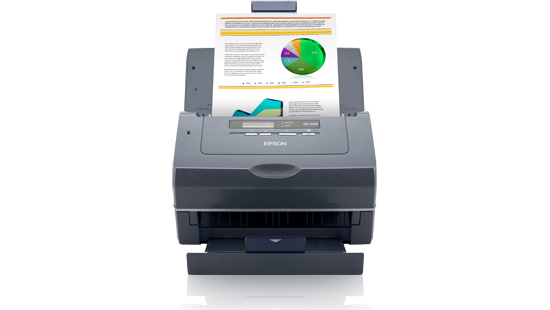
I was enthusiastic about the Epson GT-S50 desktop color document scanner when I bought it three years ago. So, how’s it holding up? Very well – it  works as well today as when it was new. It still scans fast, with excellent results, after moderately heavy use for most of those three years – a lifetime in the world of computer hardware. It seldom jams and has not caused me any grief due to repair time.

The paper saver.

I couldn’t say that about my previous scanner, a Fujitsu ScanSnap that jammed when I tried to feed it more than one sheet of paper. After two years of frustration, it worked as badly as when it was new.

But let’s back up a moment. Why buy a document scanner in the first place? Because it’s the best way to get rid of paper clutter while keeping records you might need later. If you organize your scans logically, you’ll find documents you need in minutes, instead of shuffling through storage boxes full of paper.

Folks who do a moderate number of scans might also consider all-in-one printer/copy/fax/scanner because they are cheaper than desktop document scanners. But in most all-in-ones, the size of original documents is limited to 8 1/2 by 11 inches. If you have one of those and are happy with it, you might want to skip the expense of a dedicated document scanner. But my experience with all-in-ones is they print well, but scan and copy less well. 

Desktop scanners and all-in-ones work pretty much the same way: Load a document feeder with paper documents, photos, business cards – any flat original – call up the provided scanning software, choose a format, such as “pdf,” for saving the document, the resolution you want – 300 dots per inch works fine for my needs – and in the software, click on “scan.” Couldn’t be simpler.

The paper document passes over a high-intensity light, and winds up in a receiving tray. The potential for paper jams is high, yet the Epson scanner will handle even wrinkled paper documents and minimize the wrinkles in the finished scane. Scanned documents look good at the lower resolution setting and as good as originals at higher settings.

The desktop scanner I own weighs a sturdy nine pounds, so it won’t slip around on a desk. Its software is compatible with both Windows PCs and Macs. It will handle documents as long as 36 inches, scans on both sides in color and will handle fragile documents or business cards in a plastic carrier sheet.  It connects to a Windows PC or Mac via a USB cable. Epson’s tech support, in the unlikely event you’ll need it, is free, with short hold times.

And it’s fast. At lower resolutions, which can be chosen to handle less crucial documents, it will scan both sides at the rate of 50 sheets a minute

I scan documents as “pdf’s” – portable document files – because they can be opened and read  by any computer or tablet that has Adobe’s free Acrobat Reader installed. But other formats are available, such as “tiff.”   That format is handy when photos are edited using software such as Adobe Photoshop Elements or Corel’s PaintShop.

When I finish scanning documents, I give them unique names. My electric bill becomes “2016.08 Electric.Bill,” assuring that I can find it on my PC or backup disk drive. Once I’ve chosen names for the scanned files, I create folders. The general one is simply “2016.” A sample subfolder would be “2016 Utilities.” A subfolder of that would be named “2016 Electric Bills.” The electric bill I just scanned would go into that folder. My scans go back to 2009, when I bought my first of two Fujitsu scanners.

Printer has tanks of ink.

How handy is this? The other day I was looking for warranty information for a computer mouse that was starting to fail. I wasn’t certain about when I bought the mouse, so I did a search for the file in the box at the lower left corner in Windows 10. In an instant, the file popped up. While I was out of luck as far as warranty was concerned, I was spared the tedious search through boxes of paper.

The GT-S50 has been replaced by the model DS-560, which has all the features of the former – and has the advantage of wireless and wired networking. If you shop around, you can get the newer model for less than $300. If you’re set on the scanner I have – the GT-S50 – you can still find it for about $500 at a few stores. If I had to replace my current scanner, I’d choose the less-expensive one that replaced the GT-S50. I’d pass on a flatbed or all-in-one. I don’t think the quality of scans is as good as the desktop.

Bottom line? A document scanner is worth its weight in paper storage boxes.

Good Deals on PCs without the Hassle

Buying a PC online can be challenging… Here’s how to get a good deal!

Buying a PC can be like buying a car. You can go to a dealership armed with information from the Auto Club about how much the vehicle cost the dealer. You also can blast dealers with website queries about their best deals. Armed with your research, you start playing the dealership two-step.

Buying a PC online can be challenging… Here’s how to get a good deal!

Buying a PC can be like buying a car. You can go to a dealership armed with information from the Auto Club about how much the vehicle cost the dealer. You also can blast dealers with website queries about their best deals. Armed with your research, you start playing the dealership two-step.

Based on your research, you make an offer, the dealer counters, and it goes back and forth for the better part of an afternoon. Or you can just pay sticker price, with add-ons such as fancy mud flaps, wheel locks, cargo tray, and special wax jobs for an extra $700 and drive away. I almost envy people like that.  No one gets insulted, and there’s no back and forth. But it’s just not me.

There’s always a salesman on a website who is hungry to meet his sales quota.

Buying a computer has many of the same elements. You can go to a big-box store and buy last season’s PCs at a discount, or you can pay nearly full price for the latest-generation processor. If you just need a PC for Internet surfing and word processing, last season’s PCs might be a great deal. Shopping online at manufacturers’ websites can be confusing, at best, even though all the specs are listed for their PCs.

I’m a shopper. It took me years to find a car salesman who gives me a set price, which is better than I could get anywhere else, and he doesn’t drive me crazy with expensive options like fancy wax jobs and mud flaps, wheel locks and cargo trays. He calls me every two years to see how I’m doing, I tell him what color I want, and counting drive time, in two hours I have the keys to the car I want. Since I’ve done my research, he always matches the best price I can get from other dealers.

You may not get that kind of experience from a computer website or a big-box store. Here’s a recent experience I had with Dell.

I chose to communicate by chat. I knew exactly what kind of computer I wanted, and asked the salesman for the best deal he could give me. After some haggling, and checking with his supervisor, he offered me 2 percent off, but only if he could call me. Against my better judgment, I gave him my number, and in a flash he had me on the line.

“I can only give you 2 percent off if you buy premium tech support, and I can give you that for $119 for two years.” I knew from experience that basic support is worthless. Techs are not knowledgeable, and if there’s a hardware failure, the PC has to be mailed in. But I tell him that he has to sharpen his pencil. “That’s the best I can do,” he says.

Undaunted, I have chats with two other salesmen. Same thing: 2 percent off, but only if he can call me. Each time, the salesman offered premium tech support for $119 for two years – and accidental coverage for another $58 for two years.

Finally, on the fourth try, I get the salesman I’m looking for. It’s one hour before closing time. Just as car salesmen have quotas to fill, I’ve found that getting a deal on a car is more likely at the end of the month. With PCs, it’s the end of the day.

“We have one model on sale for 15 percent off,” he tells me via chat.

“What’s the catch?”

“No catch. I’ll call you, if you wish.”

He introduces himself, and gives me the bottom-line price, which truly is 15 percent less than the online price. And then, it starts:

Basic support, which comes with the computer, offers only hardware support, no software support. Mail-in turnaround is at least two weeks. Premium support has 24/7 techs and onsite service for $69 a year, $119 for two years. “But you really should get accidental coverage, too.” “Do you need a mouse?” He has mice.” A carrying case?” He has backpacks, messenger bags – all kinds of bags. “You know, it’s always a good idea to have an external backup drive.” Yes, I know. “I can give you Microsoft Office for a special price of $299.” It’s the old custom mud flaps, wheel locks, fancy wax job routine.  But I’m not buying it.

I realize that Dell has cut prices on its PCs nearly to the bone – it’s the add-ons that put their ledgers in the black. I take the two years of premium support, the salesman sighs and takes my credit card. Before I give him my credit card information, I add, “Shipping is free, right?” He thinks about his commission and sighs again. “Right.”

I buy at least one computer each year, but only if I can get a major discount. When Amazon offers a one-day discount, I have a list of things I need, and take advantage of the offer. When Best Buy had an iPad Air on sale in a four-hour flash deal, I pounced. Each holiday season, Apple has a one-day discount on its products. Still, I have lots to learn about shopping. My daughter and her friends subscribe to websites that offer myriads of deals – especially steep discounts on air fare.

I’m not always a careful shopper. Sometimes, in my rush to buy something that could have waited for a special deal, I pay retail, tax and shipping. But I do know one thing: There is a salesman on a website who is hungry to meet his sales quota. He understands after a few minutes that I’m not about to pay for accessories that I don’t need. He makes his sale quickly, I’m a happy camper, and the economy just got stronger. It’s one reason why the Fed is so optimistic about the state of economy that it raised interest rates.

Fear and Convenience with Amazon Echo

Is there an echo in the room?

More than 3 million Amazon Echos  have been sold; I got mine as a Father’s Day gift. The $180 device is about 9.5 inches tall, 3.2 inches at the round base, and weighs a bit more than 2 pounds.

Is there an echo in the room?

More than 3 million Amazon Echos have been sold; I got mine as a Father’s Day gift. The $180 device is about 9.5 inches tall, 3.2 inches at the round base, and weighs a bit more than 2 pounds.

If  I need to know where the closest pizza joint is, I summon Alexa, the clear voice of the Echo, with “Alexa, where’s the nearest pizza restaurant?” I know Alexa – whose voice is natural, and doesn’t sound as if it’s computer generated — is listening because a blue light shines on the top of the Echo. Alexa responds in seconds, “The nearest pizza  restaurant is …” She’ll give me the name of the restaurant, its address and phone number and tell me if it’s open.

Alexa-Echo-Harold's_Helpware-Harold_Glicken
Is the Echo listening to more than my commands?

It works on my home’s wireless network,  and can be plugged in anywhere. It can hear me from adjacent rooms just fine. After a very easy set up (on an Apple, Fire OS or Android device), it knows where I live and tailors answers – in lightning speed – for my location.

I threw it a curve by asking her about the weather in Saskatoon, Saskatchewan. She not only gives me the current temperature, but adds the forecast for the day, including high and low temperatures. For no good reason I’m also concerned that Saskatoon may be in store for a heat wave, so I ask for the forecast for two days out.

Relieved that the weather will remain moderate, I ask Alexa to find me a book I’d like to read, but I want someone to read it for me. Alexa finds the book, hooks me up with the Amazon bookstore, puts the charge on my account, and the book comes alive. I also could summon Alexa to order something for me on the Amazon website.

I like to hear classical music when I work, so when I discovered the vast free music library that comes as part of my Prime account, I created playlists online from my PC, gave the playlists names and asked Alexa to play them. The music sounds remarkably good, too – the Echo has a 2.5-inch woofer and a 2-inch tweeter.

When I want to turn on a light that’s controlled by my Insteon smart home hub, I simply summon Alexa and ask her to turn on my dining room light or any other device that it can connect to, including thermostats. It’s almost as easy, but far more fun, than tapping the light switch.

I’ve only scratched the surface of what Alexa can do. But there’s one concern, and it’s not that the futuristic film I saw some 60 years ago – in the frostiest years of the Cold War – didn’t realistically portray what a device like Alexa can do. At the risk of being a killjoy, what concerns me is this: Is the Echo listening to more than my commands? Are my private conversations and commands being transmitted to a massive database in the cloud, and entered into my personal file, there to be analyzed by government snoops? So I asked Alexa if she is spying on me.

“I only send audio back to Amazon when I hear the wake word. For more information, see the privacy notice.”

Still, I ask Alexa not to spy on me.

“I’m sorry,” she says, “but I can’t find the answer to the question I heard.”

Neither can I.