
Endless Printing For Thrifty Souls

Epson’s new Eco Tank printer offers freedom from ink cartridges

A funny thing happened on my way to the local office-supply store the other day. I sat in my car in the store’s parking lot and wondered why I was making yet another weekly trip to buy ink.

Epson’s new Eco Tank printer offers freedom from ink cartridges

( I wrote this review nearly a year ago, and everything I wrote then applies today, too.)

A funny thing happened on my way to the local office-supply store the other day. I sat in my car in the store’s parking lot and wondered why I was making yet another weekly trip to buy ink.

An economical printer that pays for itself many times over.

The five cartridges in my HP inkjet printer gobble up ink so fast that I can get barely 40 glossy color prints out of them, and as few as 150 black/white pages. Yes, in this age of digital camera files that are put up on Facebook for free, I’m still printing glossies on my inkjet printer. The price is not right; the five cartridges total out to about $80 for a printer that cost less than $200. What a sap.

HP, Canon and the other printer manufacturers price their inkjet  printers low; they make their money on ink cartridges. Nothing new there. Thrifty souls buy remanufactured ink cartridges, which the printer companies say will void the warranty if the cartridges leak. I’ve had terrible luck with remanufactured cartridges. While none leaked, the ones I bought on the Internet ran out twice as fast as the real thing. Their colors weren’t true either. Some people swear by them. Others swear at them, me included.

What if someone manufactured an inkjet printer that had larger cartridges, I wondered in the parking lot. Something big, as in ink tanker hoses running directly into the printer. So, I did some research.

What I found was the answer to my inkjet nightmare: the Epson Workforce ET-4550, which comes equipped with enough ink to last for up to two years. That would be enough to print 11,000 black pages and 8,500 color pages. That’s equivalent to 50 sets of the ink cartridges my HP inkjet would use. I did the math in my head: 50 times $80 is $4,000. The printer costs $500. Net savings? Do the math.

Epson’s new Eco Tank line of printers also copy, scan and fax. Glossy color prints are at least as good or better than my HP inkjet. The quality is very good, but not in the league of the best inkjet printers. Black printing is laser-quality. It’s wireless (one of the easiest to set up wireless printers I’ve ever had), it also can work on its own network, it prints on both sides, works with both Windows PCs and Macs, has a generous two-year warranty,  its (flimsy) paper tray can handle 150 pages and it prints out to the strains of Brahms Violin Concerto No. 5. Well, I’m exaggerating a bit.

Here’s how it works:

The printer comes with black, magenta, cyan and yellow ink bottles. You’ve never seen ink cartridges like these. You snip off the pouring sides of the ink bottles and empty them into the color-coded reservoirs on the side of the printer. Word of caution: wear gloves — printer ink won’t wash out of clothes and it hangs around on hands like original sin. Fill all the reservoir tanks, a process that takes maybe 10 minutes, and you’re ready to print.

And print. And print.

I printed 50 8-by-10 glossy color photos and barely made a dent in the ink supply. Then I printed out the 100-page black-and-white manual for my Apple Watch (guess what I got for my birthday). And then I printed a bunch of color classroom material for my teacher daughter. When my grandson came over, we printed every possible Cat in the Hat game, puzzle, song sheet, cutout and coloring sheet. Still the ink levels in the tanks were high.

I probably would have gone through two sets of regular ink cartridges for my HP.

You might think that replacement cartridges for the Epson Eco Tank would cost hundreds of dollars. In fact, they costs $52 for all four cartridges.

Are there downsides? Printing at the highest quality black and white or color is definitely slower than my mid-range HP. It took up to three-minutes to print a high-resolution glossy color print. The paper tray should hold more sheets. The printer could be quieter. My first demo printer had a few hiccups, which Epson tech support promptly helped me fix. I was on hold for less than two minutes, the call is free, as is the support.

Other Eco Tank printers start at $379. If I were buying one today, I’d go for the 4550 – it seems to be the sweet spot between price and economy.

If you’re on a budget, if you like to print and print and print, this printer cries out for attention – yours.

More information: http://www.epson.com.
Talk Is Cheap With magicJackGo

Talk is cheap with magicJackGo

Let’s pretend you’re visiting England and you want to call home and relate to your mate every boring detail of your trip. Likely she’ll lay the phone gently on the table, let you babble on and go about her business. No matter. Why, the British Museum alone is worth three hours of chatting into the ozone. Even at a few pence a minute, you’re likely to rack up pounds of talk time, especially from a hotel room. But there is a better way, and it’s not to skip calling.

The better way to chat

London calling

Let’s pretend you’re visiting England and you want to call home and relate to your mate every boring detail of your trip. Likely she’ll lay the phone gently on the table, let you babble on and go about her business. No matter. Why, the British Museum alone is worth three hours of chatting into the ozone. Even at a few pence a minute, you’re likely to rack up pounds of talk time, especially from a hotel room. But there is a better way, and it’s not to skip calling.

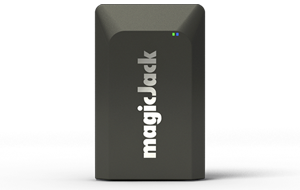
The better way is magicJackGo, a device you can slip into a shirt pocket and take with you to the four corners of the globe.

When you get the device, you register to get a local phone number. I chose the 424 area code, since it encompasses Beverly Hills, which is sort of (in my dreams) near the area where I live.

You plug the magicJackGo into a USB port on your laptop computer, call up a virtual keypad and dial home. If your PC doesn’t have a mic, you need to supply your own.

Your long-suffering mate sees the 424 number and reluctantly picks up.

What’s going on here? Even though you’re thousands of miles away, magicJack thinks you’re still in the 424 area code, because that’s the phone number assigned to it. No toll charges for these calls, thank you very much. And, should your wife want to call you, she dials the 424 number, and the call is free for her, too. Who said talk isn’t cheap?

How cheap? The device and one year of service costs $60. That compares with the $40 a month I pay for my Time Warner phone service, and $120 a month I pay for my cell phone service, which, by the way, AT&T would charge outrageous amounts for international calls. That $60 includes unlimited calls to the U.S. and Canada. But it gets even better.      

If you take your U.S.-based cell phone with you, you can download the magicJack app and make free calls to just about any number on the globe if both your call recipient and you have the magicJackGo. 

Now then, suppose you’re not a world traveler, and you just want phone service at your home or business. MagicJack has you covered there, too. Just plug it into a phone and a cable router with the included Ethernet cable, and you have phone service. For as little as $20 on a five-year plan, you get 911, conferencing, voice mail that includes an email with an audio file you can play, directory assistance, call forwarding and a seat on the next space shuttle.

It also works fine with fax machines. I have two magicJacks, one for my fax machine and one for my work number. If I wanted to cut the cord for my cable phone service, I could get my current number ported over for $10. Vanity numbers, such as “424-IBoring” cost another $10.

There are some minor downsides to the magicJackGo. While call quality is good if you have high-speed Internet service, if you’re on a cheapie plan with your cable provider, your calls can sound as if you’re in a barrel, in order for the app to work on the road, it has to be open at all times. Otherwise, incoming calls go directly into voice mail. And if your PC doesn’t have a built-in microphone, you have to buy one. If you’re making international calls, and your recipient doesn’t have a magicJackGo, expect to pay anywhere from 2 cents a minute to Mexico to $2.51 a minute to Antarctica.

McMurdo, here I come.

A Second Look at the Epson GT-S50 Desktop Scanner

Still scanning after all these years

It’s one thing to write a positive review of  the latest office essential when it’s new, but what about a follow-up: How has it performed after years of use?

Still scanning after all these years

It’s one thing to write a positive review of  the latest office essential when it’s new, but what about a follow-up: How has it performed after years of use?

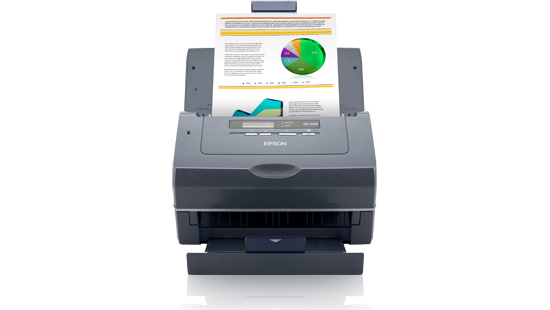
I was enthusiastic about the Epson GT-S50 desktop color document scanner when I bought it three years ago. So, how’s it holding up? Very well – it  works as well today as when it was new. It still scans fast, with excellent results, after moderately heavy use for most of those three years – a lifetime in the world of computer hardware. It seldom jams and has not caused me any grief due to repair time.

The paper saver.

I couldn’t say that about my previous scanner, a Fujitsu ScanSnap that jammed when I tried to feed it more than one sheet of paper. After two years of frustration, it worked as badly as when it was new.

But let’s back up a moment. Why buy a document scanner in the first place? Because it’s the best way to get rid of paper clutter while keeping records you might need later. If you organize your scans logically, you’ll find documents you need in minutes, instead of shuffling through storage boxes full of paper.

Folks who do a moderate number of scans might also consider all-in-one printer/copy/fax/scanner because they are cheaper than desktop document scanners. But in most all-in-ones, the size of original documents is limited to 8 1/2 by 11 inches. If you have one of those and are happy with it, you might want to skip the expense of a dedicated document scanner. But my experience with all-in-ones is they print well, but scan and copy less well. 

Desktop scanners and all-in-ones work pretty much the same way: Load a document feeder with paper documents, photos, business cards – any flat original – call up the provided scanning software, choose a format, such as “pdf,” for saving the document, the resolution you want – 300 dots per inch works fine for my needs – and in the software, click on “scan.” Couldn’t be simpler.

The paper document passes over a high-intensity light, and winds up in a receiving tray. The potential for paper jams is high, yet the Epson scanner will handle even wrinkled paper documents and minimize the wrinkles in the finished scane. Scanned documents look good at the lower resolution setting and as good as originals at higher settings.

The desktop scanner I own weighs a sturdy nine pounds, so it won’t slip around on a desk. Its software is compatible with both Windows PCs and Macs. It will handle documents as long as 36 inches, scans on both sides in color and will handle fragile documents or business cards in a plastic carrier sheet.  It connects to a Windows PC or Mac via a USB cable. Epson’s tech support, in the unlikely event you’ll need it, is free, with short hold times.

And it’s fast. At lower resolutions, which can be chosen to handle less crucial documents, it will scan both sides at the rate of 50 sheets a minute

I scan documents as “pdf’s” – portable document files – because they can be opened and read  by any computer or tablet that has Adobe’s free Acrobat Reader installed. But other formats are available, such as “tiff.”   That format is handy when photos are edited using software such as Adobe Photoshop Elements or Corel’s PaintShop.

When I finish scanning documents, I give them unique names. My electric bill becomes “2016.08 Electric.Bill,” assuring that I can find it on my PC or backup disk drive. Once I’ve chosen names for the scanned files, I create folders. The general one is simply “2016.” A sample subfolder would be “2016 Utilities.” A subfolder of that would be named “2016 Electric Bills.” The electric bill I just scanned would go into that folder. My scans go back to 2009, when I bought my first of two Fujitsu scanners.

Printer has tanks of ink.

How handy is this? The other day I was looking for warranty information for a computer mouse that was starting to fail. I wasn’t certain about when I bought the mouse, so I did a search for the file in the box at the lower left corner in Windows 10. In an instant, the file popped up. While I was out of luck as far as warranty was concerned, I was spared the tedious search through boxes of paper.

The GT-S50 has been replaced by the model DS-560, which has all the features of the former – and has the advantage of wireless and wired networking. If you shop around, you can get the newer model for less than $300. If you’re set on the scanner I have – the GT-S50 – you can still find it for about $500 at a few stores. If I had to replace my current scanner, I’d choose the less-expensive one that replaced the GT-S50. I’d pass on a flatbed or all-in-one. I don’t think the quality of scans is as good as the desktop.

Bottom line? A document scanner is worth its weight in paper storage boxes.